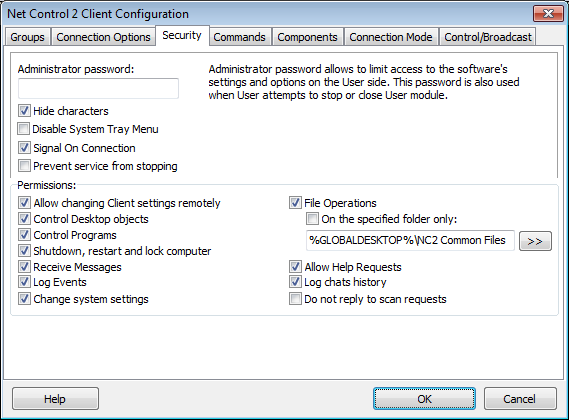
Administrator password used when a user attempts to change the settings of Net Control 2 Server or clicks the menu commands "Stop" or "Exit". We recommend setting up this parameter if you would like to prevent stopping Net Control 2 service or unauthorized configuring the service.
Disable System Tray Menu – when checked, Net Control 2 disables all commands in Net Control 2 System Tray Menu, except About menu command (available in the registered version only). System Tray icon will not be disabled.
Signal On Connection - when checked, any connection of administrator computer will be accompanied by sound signal and text message.
Warn before shutdown operation – when enabled, the client will warn a user, when remote shutdown operation is pending. The prompt will be displayed in 20 seconds before the operation will be applied.
PERMISSIONS – allows limiting the functionality of service. When permission is disabled, all features related to this permission will be disabled:
Allow changing Server settings remotely - when this permission is set, the Administrator can change Server settings remotely via the Net Control 2 Client.
Control Desktop objects - permission for controlling the Desktop of the user computer remotely, receive screenshots, run Remote Desktop and Broadcast Desktop sessions, change resolution, etc.
File Operations - permission for file operations between computers. When additionally, "On the specified folder only" option is set, all file operations may be performed within the specified folder only.
Control programs - permission to execute and terminate programs and services remotely.
Shutdown, restart, lock - permission to perform power-related operations, like shutdown, reboot, stand-by etc., and lock and unlock computer remotely.
Receive messages - permission to receive messages from the Administrator computer.
Log Events - permission for Events Watcher and Events Logger tools.
Change system settings - access to Registry, Policies, and access to the Internet etc.
Allow Help Requests - when enabled, user can send Help requests to Administrators via Net Control 2 Server menu.
Log Chats History – chat history will be logged in C:\Users\YOURLOGINNAME\AppData\Roaming\Net Control 2\nc2chat.log for Net Control 2 MiniChat and in C:\Users\YOURLOGINNAME\AppData\Roaming\Net Control 2\nc2cchat.log file for Chat tool.
Do not reply to scan requests – when enabled, the computer will not respond to a teacher computer, when it scans the network for computers.